

You are reading docs for v2, click here for the latest version.
- elements:utilities
- introduction
- getting-started
- routing
- utilities
- elements:layouts
- elements:action-bar
- elements:components
- elements:dialogs
FlexboxLayout
This is an overview of the most common usage of FlexboxLayout. For more information about the available properties, methods, or events, head over to the complete API documentation for FlexboxLayout.
<FlexboxLayout>はCSS Flexbox layoutと全く同じ機能を提供しないレイアウトコンテナです。このレイアウトは子要素を並行方向・垂直方向に整理することを可能にします。
例
デフォルトのフレックスレイアウト
次の例では全体の高さを満たす等しい大きさの3つの要素からなる行を生成しています。
<FlexboxLayout backgroundColor="#3c495e">
  <Label text="first" width="70" backgroundColor="#43b883"/>
  <Label text="second" width="70" backgroundColor="#1c6b48"/>
  <Label text="third" width="70" backgroundColor="#289062"/>
</FlexboxLayout>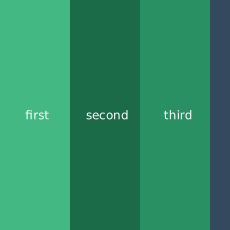
列になるフレックスレイアウト
次の例では全体の幅を満たす等しい大きさの3つの要素からなる列を生成しています。
<FlexboxLayout flexDirection="column" backgroundColor="#3c495e">
  <Label text="first" height="70" backgroundColor="#43b883"/>
  <Label text="second" height="70" backgroundColor="#1c6b48"/>
  <Label text="third" height="70" backgroundColor="#289062"/>
</FlexboxLayout>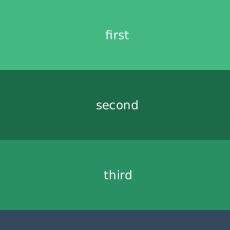
flex-startに向かって要素が寄せられたフレックスレイアウト
次の例では画面の上部に配置された3つの要素からなる行を生成しています。要素は記述された順番に配置されます。
<FlexboxLayout alignItems="flex-start" backgroundColor="#3c495e">
  <Label text="first" width="70" height="70" backgroundColor="#43b883"/>
  <Label text="second" width="70" height="70" backgroundColor="#1c6b48"/>
  <Label text="third" width="70" height="70" backgroundColor="#289062"/>
</FlexboxLayout>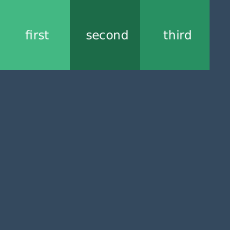
フレックスレイアウトで行の順番をカスタマイズする
次の例では画面の上部に配置された3つの要素からなる行を生成しています。要素は指定された順番に配置されます。
<FlexboxLayout alignItems="flex-start" backgroundColor="#3c495e">
  <Label text="first" order="2" width="70" height="70" backgroundColor="#43b883"/>
  <Label text="second" order="3" width="70" height="70" backgroundColor="#1c6b48"/>
  <Label text="third" order="1" width="70" height="70" backgroundColor="#289062"/>
</FlexboxLayout>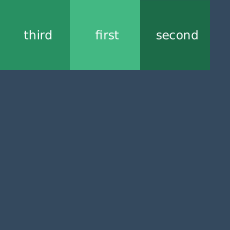
フレックスレイアウトで行を折りたたむ
次の例で4つの要素からなる折りたたまれた行を生成しています。行がスペースをはみ出た時、コンテナが最後の要素を新しい行へと移動させます。
<FlexboxLayout flexWrap="wrap" backgroundColor="#3c495e">
  <Label text="first" width="30%" backgroundColor="#43b883"/>
  <Label text="second" width="30%" backgroundColor="#1c6b48"/>
  <Label text="third" width="30%" backgroundColor="#289062"/>
  <Label text="fourth" width="30%" backgroundColor="#289062"/>
</FlexboxLayout>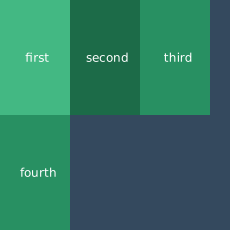
要素ごとに異なるalignSelfで、逆順に整列した行のフレックスレイアウト
次の例でどのように使うのか説明します:
flexDirectionで要素を下から行で配置するのに使います。justifyContentで要素間の垂直方向の余白を等しくします。alignSelfでメインの軸に対する位置を調整します。
<FlexboxLayout flexDirection="column-reverse"
               justifyContent="space-around" backgroundColor="#3c495e">
  <Label text="first" height="70" backgroundColor="#43b883"/>
  <Label text="second" alignSelf="center" width="70" height="70" backgroundColor="#1c6b48"/>
  <Label text="third\nflex-end" alignSelf="flex-end" width="70" height="70" backgroundColor="#289062"/>
  <Label text="fourth" height="70" backgroundColor="#289062"/>
</FlexboxLayout>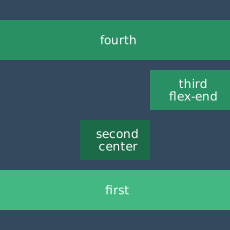
Props
| 名前 | 型 | 説明 |
|---|---|---|
flexDirection | String | フレックスボックスのコンテナ内の子要素の配置する向きを設定します。 有効な値: row (horizontal、左から右へ)row-reverse (horizontal、右から左へ)column (vertical、上から下へ)column-reverse (vertical、下から上へ).デフォルトの値: row. |
flexWrap | String | 子要素の並びを一行に強制するか複数行を可能にするか設定します。また、新しいラインの積み重なる向きも定義します。 有効な値: nowrap (コンテナからはみ出すことになる、一行のレイアウト)wrap (複数行、向きはflexDirectionにより定義される)wrap-reverse (複数行、向きはflexDirectionの反対に定義される).デフォルトの値: nowrap. |
justifyContent | String | 子要素の軸と同じ向きの整列の仕方を設定します。全ての子要素が伸縮しない時や、伸縮しても大きさの最大値に達しなかった時の余白に対して使えます。また、子要素がはみ出た時のふるまいの調整荷物変えます。 有効な値: flex-start (items are packed toward the start line),flex-end (items are packed toward the end line),center (items are centered along the line),space-between (items are evenly distributed on the line; first item is on the start line, last item on the end line), andspace-around (items are evenly distributed on the line with equal space around them).デフォルトの値: flex-start. |
alignItems | String | (Androidのみ) 現在の行で軸と同じ向きの子要素の整列の仕方を設定します。軸と垂直方向に対するjustifyContentと同じように動作します。有効な値: flex-start (cross-start margin edge of the items is placed on the cross-start line),flex-end (cross-end margin edge of the items is placed on the cross-end line),center (items are centered оn the cross axis),baseline (the item baselines are aligned), andstretch (items are stretched to fill the container but respect min-width and max-width).デフォルトの値: stretch. |
alignContent | String | 軸と垂直方向に対する行の整列方法を設定します。justifyContentがメインの軸の子要素を個別に整列させるふるまいと似ています。コンテナに一行しか存在しない場合は、このプロパティの影響はありません。 有効な値: flex-start (lines are packed to the start of the container),flex-end (lines are packed to the end of the container),center (lines are packed to the center of the container),space-between (lines are evenly distributed; the first line is at the start of the container while the last one is at the end),space-around (lines are evenly distributed with equal space between them), andstretch (lines are stretched to take up the remaining space).デフォルトの値: stretch. |
Additional children props
<FlexboxLayout>の直接の子要素は、追加で以下のプロパティを使用できます。
| 名前 | 型 | 説明 |
|---|---|---|
order | Number | 子要素の現れる順番を設定します。 |
flexGrow | Number | 必要な場合、子要素の大きさが拡大するかを指定します。フレックスコンテナ内の他の子要素との比率で、拡大する比率を設定します。 |
flexShrink | Number | 必要な場合、子要素の大きさが縮小するかを指定します。フレックスコンテナ内の他の子要素との比率で、縮小する比率を設定します。指定されていない場合は、1として設定されます。 |
alignSelf | String | (Androidのみ) 子要素のalignItemsの値を上書きします。有効な値: flex-start (cross-start margin edge of the item is placed on the cross-start line),flex-end (cross-end margin edge of the item is placed on the cross-end line),center (item is centered on the cross axis),baseline (the item baselines are aligned), andstretch (items is stretched to fill the container but respects min-width and max-width).デフォルトの値: stretch. |
flexWrapBefore | Boolean | trueの時、子要素が新しい行を覆うようにします。このプロパティは公式のFlexboxでは存在しません。デフォルトの値: false. |
Contributors