
You are reading docs for v2, click here for the latest version.
- elements:utilities
- introduction
- getting-started
- routing
- utilities
- elements:layouts
- elements:action-bar
- elements:components
- elements:dialogs
DockLayout
This is an overview of the most common usage of DockLayout. For more information about the available properties, methods, or events, head over to the complete API documentation for DockLayout.
<DockLayout>はレイアウトの端か中央へ子要素を固定するレイアウトです。
<DockLayout>の特徴は以下の通りです:
dockプロパティは、子要素を固定する方向をレイアウトのleft,right,top,bottomか中央に設定するときに使います。
子要素を中央へdockしたいときは、それはコンテナの中で子要素の最後である必要があり、 親要素のstretchLastChildプロパティをtrueにする必要があります。- Enforces layout constraints to its children.
- 子要素のサイズが変更された時、ランタイム上で子要素の大きさを変更します。
例
最後の子要素を引き伸ばさずに全ての端に固定する
次の例はスクリーン上の4端に配置される4つの要素を含むフレームのようなレイアウトです。
<DockLayout stretchLastChild="false" backgroundColor="#3c495e">
  <Label text="left" dock="left" width="40" backgroundColor="#43b883"/>
  <Label text="top" dock="top" height="40" backgroundColor="#289062"/>
  <Label text="right" dock="right" width="40" backgroundColor="#43b883"/>
  <Label text="bottom" dock="bottom" height="40" backgroundColor="#289062"/>
</DockLayout>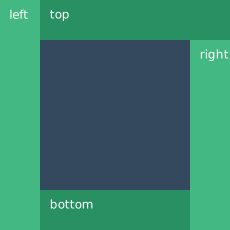
最後の子要素を引き伸ばして全ての端に固定する
次の例はDockLayoutコンテナでstretchLastChildがどのように子要素の配置に影響するか示しています。 最後の子要素(bottom)はそれ以前の3つの要素を配置した際に残るスペースを埋めるように引き伸ばされます。
<DockLayout stretchLastChild="true" backgroundColor="#3c495e">
  <Label text="left" dock="left" width="40" backgroundColor="#43b883"/>
  <Label text="top" dock="top" height="40" backgroundColor="#289062"/>
  <Label text="right" dock="right" width="40" backgroundColor="#43b883"/>
  <Label text="bottom" dock="bottom" backgroundColor="#1c6b48"/>
</DockLayout>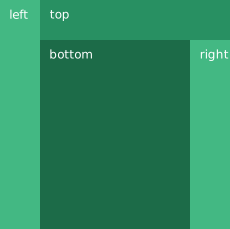
すべての端と中央に要素を固定する・
次の例では5つの要素からなる<DockLayout>を生成しています。初めの4つの要素が中央の要素を囲むフレームとなっています。
<DockLayout stretchLastChild="true" backgroundColor="#3c495e">
  <Label text="left" dock="left" width="40" backgroundColor="#43b883"/>
  <Label text="top" dock="top" height="40" backgroundColor="#289062"/>
  <Label text="right" dock="right" width="40" backgroundColor="#43b883"/>
  <Label text="bottom" dock="bottom" height="40" backgroundColor="#289062"/>
  <Label text="center" backgroundColor="#1c6b48" />
</DockLayout>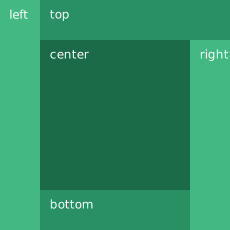
同じ端に向けて複数の子要素を固定する
次の例では全体の高さと幅まで引き伸ばして、一定の方向に向かって4つの要素を生成しています。
<DockLayout stretchLastChild="true" backgroundColor="#3c495e">
  <Label text="left 1" dock="left" width="40" backgroundColor="#43b883"/>
  <Label text="left 2" dock="left" width="40" backgroundColor="#289062"/>
  <Label text="left 3" dock="left" width="40" backgroundColor="#1c6b48"/>
  <Label text="last child" backgroundColor="#43b883"/>
</DockLayout>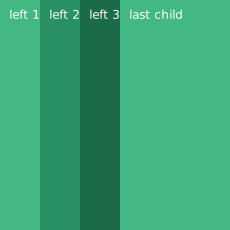
Props
| Name | Type | Description |
|---|---|---|
stretchLastChild | Boolean | 最後の子要素が余ったスペースを埋めるかどうかを許可します。 |
Additional children props
要素が<DockLayout>の直接の子要素である場合、追加で以下のプロパティが使えます。
| Name | Type | Description |
|---|---|---|
dock | String | どの方向へ要素を固定するか指定します。 有効な値: top、 right、 bottom、 left。 |
Contributors