

- elements:utilities
- introduction
- getting-started
- routing
- utilities
- elements:layouts
- elements:action-bar
- elements:components
- elements:dialogs
- elements:utilities
This is an overview of the most common usage of DockLayout. For more information about the available properties, methods, or events, head over to the complete API documentation for DockLayout.
<DockLayout> is a layout container that lets you dock child elements to the sides or the center of the layout.
<DockLayout> has the following behavior:
- Uses the
dockproperty to dock its children to theleft,right,top,bottomor center of the layout.
To dock a child element to the center, it must be the last child of the container and you must set thestretchLastChildproperty of the parent totrue. - Enforces layout constraints to its children.
- Resizes its children at runtime when its size changes.
Examples
Dock to every side without stretching the last child
The following example creates a frame-like layout consisting of 4 elements, position at the 4 edges of the screen.
<DockLayout stretchLastChild="false" backgroundColor="#3c495e">
  <Label text="left" dock="left" width="40" backgroundColor="#43b883"/>
  <Label text="top" dock="top" height="40" backgroundColor="#289062"/>
  <Label text="right" dock="right" width="40" backgroundColor="#43b883"/>
  <Label text="bottom" dock="bottom" height="40" backgroundColor="#289062"/>
</DockLayout>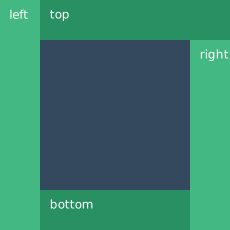
Dock to every side and stretch the last child
The following example shows how stretchLastChild affects the positioning of child elements in a DockLayout container. The last child (bottom) is stretched to take up all the remaining space after positioning the first three elements.
<DockLayout stretchLastChild="true" backgroundColor="#3c495e">
  <Label text="left" dock="left" width="40" backgroundColor="#43b883"/>
  <Label text="top" dock="top" height="40" backgroundColor="#289062"/>
  <Label text="right" dock="right" width="40" backgroundColor="#43b883"/>
  <Label text="bottom" dock="bottom" backgroundColor="#1c6b48"/>
</DockLayout>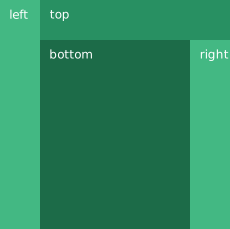
Dock to every side and the center
The following example creates a <DockLayout> of 5 elements. The first four wrap the center element in a frame.
<DockLayout stretchLastChild="true" backgroundColor="#3c495e">
  <Label text="left" dock="left" width="40" backgroundColor="#43b883"/>
  <Label text="top" dock="top" height="40" backgroundColor="#289062"/>
  <Label text="right" dock="right" width="40" backgroundColor="#43b883"/>
  <Label text="bottom" dock="bottom" height="40" backgroundColor="#289062"/>
  <Label text="center" backgroundColor="#1c6b48" />
</DockLayout>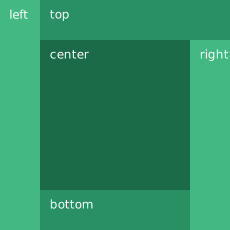
Dock multiple children to the same side
The following example creates a single line of 4 elements that stretch across the entire height and width of the screen.
<DockLayout stretchLastChild="true" backgroundColor="#3c495e">
  <Label text="left 1" dock="left" width="40" backgroundColor="#43b883"/>
  <Label text="left 2" dock="left" width="40" backgroundColor="#289062"/>
  <Label text="left 3" dock="left" width="40" backgroundColor="#1c6b48"/>
  <Label text="last child" backgroundColor="#43b883"/>
</DockLayout>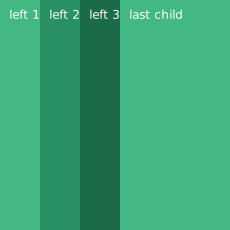
Props
| Name | Type | Description |
|---|---|---|
stretchLastChild | Boolean | Enables or disables stretching the last child to fit the remaining space. |
Additional children props
When an element is a direct child of <DockLayout>, you can work with the following additional properties.
| Name | Type | Description |
|---|---|---|
dock | String | Specifies which side to dock the element to. Valid values: top, right, bottom, or left. |